Raspberry Pi Pico
MicroPython - Basics
MicroPython - More Involved
MicroPython - Pico W
MicroPython - micro:bit
MicroPython - Projects
CircuitPython - Some Basics
CircuitPython - HID Adventures
CircuitPython - Experiments
Other Pages


Raspberry Pi Pico
Serial Enabled LCD
This page concerns the Sparkfun Serial Enabled 3.3V 16x2 LCD Character Display. It consists of a normal LCD display with a 'backpack' circuit soldered to the controller board. The backpack converts UART into the control signals that the display needs. This means that, other than power and ground, you only need a single data pin on the micro:bit to control the display. I connected that to GP12, which is a designated tx pin for UART0.
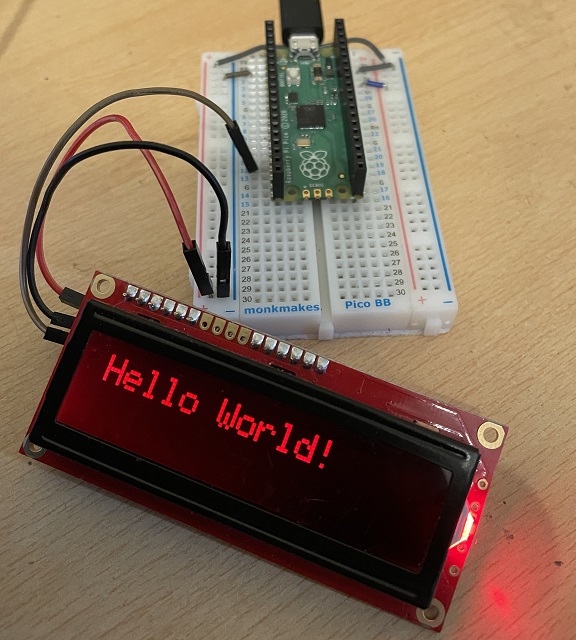
These displays are not particularly cheap but they work really well. I wrote a library to make it easy to use. The library is really just a load of specific commands that I looked up on Sparkfun's guide page for the product. Save this to the Pico as serlcd.py
class SerLCD:
    def __init__(self, uart):
        self.uart = uart

    def cmd(self, c):
        self.uart.write(b'\xfe')
        self.uart.write(bytes([c]))

    # 128 - off, 157 full
    def brightness(self, b):
        self.uart.write(b'\x7c')
        self.uart.write(bytes([b]))

    def home(self):
        self.cmd(128)

    def home2(self):
        self.cmd(192)

    def clear(self):
        self.cmd(1)

    def right(self):
        self.cmd(20)

    def left(self):
        self.cmd(16)

    def off(self):
        self.cmd(8)

    def on(self):
        self.cmd(12)

    def underline_on(self):
        self.cmd(14)

    def underline_off(self):
        self.cmd(12)

    def box_on(self):
        self.cmd(13)

    def box_off(self):
        self.cmd(12)

    def write(self, txt):
        self.uart.write(txt)
Here is some test code.
from machine import Pin, UART
from time import sleep
from serlcd import SerLCD
uart = UART(0, baudrate=9600, tx=Pin(12))

lcd = SerLCD(uart)
sleep(3)
lcd.clear()
lcd.write("Hello World!")
sleep(5)
lcd.clear()
for i in range(100):
    lcd.home()
    lcd.write(str(i))
    sleep(0.2)