Visual C# Guide
Simple Applications
Sudoku Application
Fractal Explorer
SFML Graphics Guide
Taking C# Further



Visual C# (Windows) Guide
SFML Graphics: ContextMenuStrip
When we right click on items and see a popup menu, we are looking at a ContextMenuStrip. With some small changes to our SFMLCanvas class and a tweak of our main form, we can make that happen.
Start by adding a ContextMenuStrip control to the form and name it mnuContext. I have filled in the menu with the following colours,
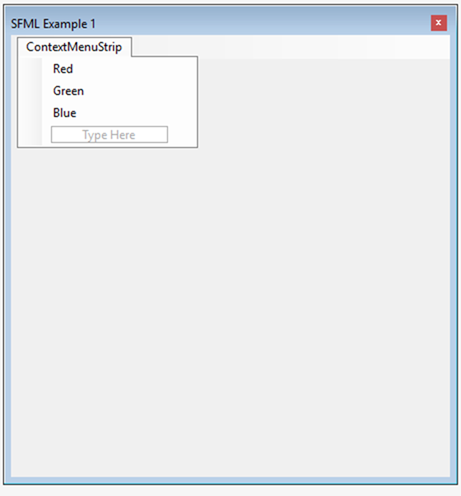
Back in the main form, make sure that you have a matching array of SFML colours defined and that the SFMLCanvas variable is declared at form level,
        private SFML.Graphics.Color[] colours =
        {
            SFML.Graphics.Color.Red,
            SFML.Graphics.Color.Green,
            SFML.Graphics.Color.Blue,
        };
        SFMLCanvas Canvas;
Now go to the SFMLCanvas class and add the following methods so that you can get the item that has been selected on the canvas and also have the ability to change the colour of one of the items in your drawing list.
        public int GetSelectedItem()
        {
            return SelectedItem;
        }

        public void ChangeItemColour(int ItemId, SFML.Graphics.Color Colour)
        {
            Shapes[ItemId].FillColor = Colour;
        }
I am building this on top of drag-drop enabled code. Change the MouseDown event so that it is as follows,
        protected override void OnMouseDown(MouseEventArgs e)
        {
            SelectedItem = -1;
            for (int i = 0; i < Shapes.Count; i++)
            {
                if (Shapes[i].GetGlobalBounds().Contains(
                    new Vector2f((float)e.X, (float)e.Y)))
                {
                    SelectedItem = i;
                }
            }
            if (e.Button == MouseButtons.Left && SelectedItem !=-1)
            {
               Dragging = true;
            }
        }
This means that the SelectedItem field is set to -1 if no item is selected, irrespective of whether the left of right mouse button has been clicked.
Back to the main form. Use the properties/events window to generate the opening and itemclicked events for the ContextMenuStrip.
        private void mnuContext_Opening(object sender, System.ComponentModel.CancelEventArgs e)
        {
            if (Canvas.GetSelectedItem() == -1)
            {
                e.Cancel = true;
            }
        }

        private void mnuContext_ItemClicked(object sender, ToolStripItemClickedEventArgs e)
        {
            int c = mnuContext.Items.IndexOf(e.ClickedItem);
            int s = Canvas.GetSelectedItem();
            Canvas.ChangeItemColour(s, colours[c]);
            Canvas.Refresh();
        }
The first event handler is making sure that the context menu does not open when you are not clicking on an item. The second event works out the index of the colour chosen and looks for the colour at the same index in our colours array. It calls the colour change method and refreshes the canvas.